Download Aurora V3.2.0
Six packages for three platforms, all from the project's GitHub releases. Free, Apache-2.0. There is no macOS or iOS version.
Connecting to GitHub This page describes V3.2.0, 25 Oct 2026 downloads so far: Android — Windows — Linux beta —
A newer release than this page describes is out: . See its release page
Release notes and per-file download counts are on GitHub releases.
Packagesa hint from your browser Phones and tablets share one APK. Windows has two installers, Linux beta three packages. You're on Android. Aurora.apk is the one package for phones and tablets; Android asks once to allow installs from your browser or file manager. You're on Windows. The .exe installs per user; the .msi replaces an older MSI install. You're on Linux beta. Each zip holds one package: .deb for Debian and Ubuntu, .rpm for Fedora and openSUSE, the AppImage for any distribution. Your browser reports macOS or iOS. Aurora has no version for either; the packages below are for Android, Windows and Linux beta.
| Platform | File | Size | Requires | Status |
|---|---|---|---|---|
| Android your system phones and tablets | Aurora.apk | 132.3 MB | Android 8.0 or newer, 64-bit | Stable |
| Windows your system installer | Aurora-3.2.0.exe | 204.5 MB | Windows 10 or 11, x64. Java is bundled. | Stable, not code-signed |
| Windows your system MSI, replaces older installs | Aurora-3.2.0.msi | 203.6 MB | Windows 10 or 11, x64 | Stable, not code-signed |
| Linux beta your system Debian, Ubuntu and derivatives | aurora-deb.zip | 187.0 MB | x86_64, glibc 2.35 or newer | beta |
| Linux beta your system Fedora, openSUSE | aurora-rpm.zip | 189.8 MB | x86_64, glibc 2.35 or newer | beta |
| Linux beta your system any distribution | aurora-appimage.zip | 199.8 MB | x86_64, FUSE | beta |
Aurora.apk installs on phones and tablets.
Windows uses .exe or .msi; Linux, in beta, uses .deb, .rpm, AppImage.
Android phone · 8.0 or newer, 64-bit Screenshot to come.
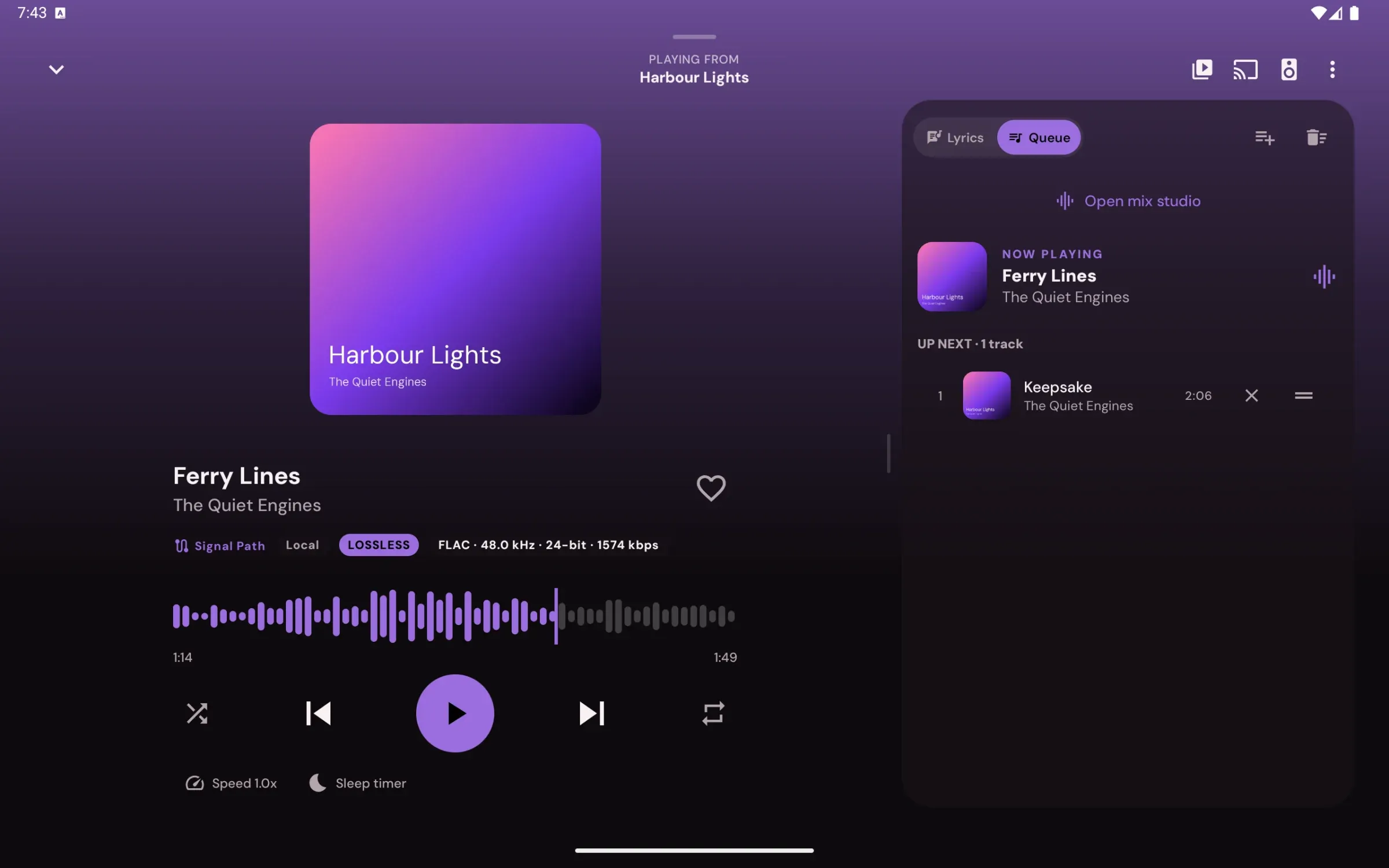
Android tablet · sidebar, two-pane settings, landscape player beside lyrics or the queue Temporary capture: Pixel Tablet emulator, V2.6.2.
Windows 10/11 · Linux beta · resizable panes, media keys, tray Screenshot to come.
Android
Install
- Download Aurora.apk on the phone.
- Open it. Android asks to allow installs from your browser or file manager the first time.
- Open Aurora. The guided setup asks how you listen, what you use and where your music is, then gives you a checklist.
Updates
Aurora checks GitHub at most once an hour when you open Settings, downloads the new APK with progress, verifies it and its signing key, then hands it to Android's installer.
- Aurora isn't on Google Play; it's installed from GitHub.
- It works without any optional permission; the Permissions screen says what each one unlocks.
- Android may ask for USB permission again each time you plug in a DAC.
Windows
Install
-
Download Aurora-3.2.0.exe or Aurora-3.2.0.msi.
Aurora-3.2.0.exeinstalls for your user with a folder chooser, Start menu and desktop shortcuts.Aurora-3.2.0.msiinstalls per user too, and replaces an older MSI install when you upgrade. - Run it. The installers aren't code-signed, so SmartScreen may show "Windows protected your PC" on first launch. Choose More info, then Run anyway.
- Open Aurora from the Start menu or the desktop shortcut.
Exclusive output
Off by default. Pick your DAC in Aurora's output settings and switch exclusive mode on; Signal Path then shows whether samples are preserved.
Works with Windows
- Media overlay and media keys (SMTC) with art, seek, shuffle and repeat
- Tray icon, with close to tray (off by default)
- Aurora's own title bar, with Snap layouts kept; Settings → Appearance → System title bar switches back
- Passwords protected with your Windows account (DPAPI)
- Keeps the PC awake while playing
- Updates from Settings → About: Aurora downloads the new MSI, checks it, runs it and closes
Keyboard
- Space
- play or pause
- Ctrl + ←
- previous
- Ctrl + →
- next
- Shift + ←
- back 5 s
- Shift + →
- forward 5 s
- Ctrl + ↑
- volume up
- Ctrl + ↓
- volume down
- Ctrl + Shift + ↓
- mute
- Ctrl + S
- shuffle
- Ctrl + R
- repeat
- Ctrl + L
- like
- Ctrl + Q
- queue
- Ctrl + F
- search
- Ctrl + K
- search
- Ctrl + ,
- settings
- F11
- full screen
- Esc
- back
- Alt + ←
- back
- Ctrl + /
- every shortcut
Linux beta
Install
- Download the zip for your distribution: aurora-deb.zip, aurora-rpm.zip or aurora-appimage.zip. Each holds one package.
- Unzip it and install the package with the commands for your distribution.
Debian, Ubuntu
unzip aurora-deb.zip sudo apt install ./aurora_*_amd64.deb
Fedora
unzip aurora-rpm.zip sudo dnf install ./aurora-*-1.x86_64.rpm
openSUSE
unzip aurora-rpm.zip sudo zypper install ./aurora-*-1.x86_64.rpm
AppImage
unzip aurora-appimage.zip chmod +x Aurora-*-x86_64.AppImage ./Aurora-*-x86_64.AppImage
Notes
- .deb recommends xdg-desktop-portal. The AppImage needs FUSE, or run it with
--appimage-extract-and-run. - Passwords and the YouTube Music, Green Music App and SoundCloud sign-ins are kept with GNOME Keyring, KWallet or another Secret Service provider; without one, they last until Aurora closes.
- On GNOME, the tray icon needs the AppIndicator extension.
- Media keys and desktop widgets work through MPRIS.
- Exclusive output opens the sound card directly through ALSA at 44.1–384 kHz, 16, 24, 24-in-32 or 32-bit. Pick the card itself, not the PipeWire or PulseAudio entry, and set the card's profile to Off if the sound server holds it.
- Linux (beta) packages are maintained by shuja and built by a GitHub Actions workflow.
Build from source
- Everything
- JDK 21 and the Gradle wrapper
- Android
- SDK 35 and 36, NDK 27.0.12077973, CMake 3.22.1
- Windows desktop
- MSVC (Visual Studio 2022 Build Tools) and CMake
- Linux desktop beta
- a Temurin JDK 21, CMake, a C++ compiler, ALSA headers, dpkg-dev and rpm
The desktop app builds on Windows and Linux (beta) only.
Build instructions in the README
- A release-signed APK can't install over a debug build; uninstall first, after a backup.
Not available
There is no macOS or iOS version, and no Google Play listing.